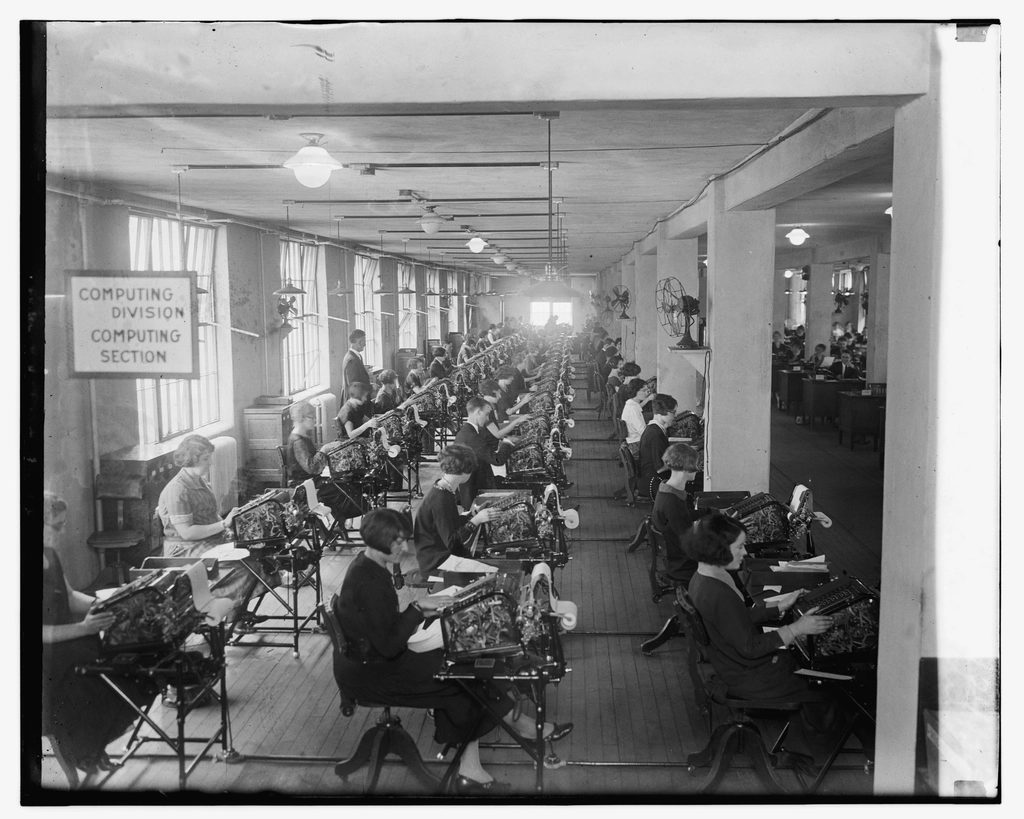
 The "Computing Division" of a US government bureau in 1924. For most of history, a computer was a person with a job title.
The Evolution of Information Technology
From the abacus to artificial intelligence. Trace the incredible journey of computing — the clever tools, brilliant minds, and breakthrough technologies that turned counting beads into the intelligent machines running our world today.
How this part works
This part is a four-hour block of study, not a single sitting. It is built as four sessions, and there is a natural stopping point at the end of each one. Work through a session, do its activity, answer its check questions from memory, then stop. Pick up at the next session when you next sit down — the lesson stays where you left it, and you mark the whole part complete at the end.
| Session | What you do | About |
|---|---|---|
| Session 1 — Early History of Computing | Read the story of nine inventions, then rebuild the timeline from memory | 65 min |
| Session 2 — The Five Generations of Computers | Learn the first three generations and what each one changed | 40 min |
| Session 3 — Fourth and Fifth Generation Computers | The era you live in — personal computers, then artificial intelligence | 45 min |
| Session 4 — The Minds Behind Computing | Meet four pioneers, and see how these shifts landed in the Philippines | 25 min |
| Glossary, recap and the final check | Review and self-test | 20 min |
| Videos | Optional viewing, listed at the end | 45 min |
| Total | Reading, activities, checks and videos | ≈ 4 hours |
What you'll be able to do
By the end of this part you will be able to:
- Explain how information technology has evolved from early computing to modern digital systems.
- Identify the five generations of computers and their defining technologies.
- Describe significant milestones in the history of computing.
- Explain, with examples, how computing changed the way people work in the Philippines and elsewhere.
Session 1 — Early History of Computing
Long before electricity, humans invented clever machines to count, calculate, and store instructions. These ideas are the DNA of every computer today.
Why start with history? Because nothing about modern computers is truly new — it is the result of thousands of years of small, brilliant steps. The smartphone in your pocket is the descendant of counting beads, gear-driven calculators, and punched cards. Understanding where these ideas came from helps you understand how computers actually work, and reminds us that today's "impossible" problems are tomorrow's ordinary tools.
In this session we'll follow the story from the very first counting tools to the machines that finally deserved the name "computer." Watch for a recurring pattern: each inventor solved a real, frustrating problem of their day — and in doing so, left behind an idea we still rely on.
What is Computing?
Computing is the process of using tools or machines to perform calculations, process information, and solve problems. The need to compute is ancient — from counting livestock and trade goods to predicting the seasons and taxing citizens — but the tools we use have transformed dramatically. Early methods began with fingers, pebbles and tally marks, then evolved into mechanical devices that could calculate faster and more reliably than any human. Every one of these tools does the same basic thing a computer does today: it takes in information (input), works on it following fixed rules (processing), and gives back a result (output).
Deep dive — Hardware vs. Software
Two words you will meet again and again in this course. Hardware is the physical part you can touch — the beads of an abacus, the gears of a calculator, the chips in a laptop. Software is the set of instructions that tells the hardware what to do — like the punched cards in a Jacquard loom, or the apps on your phone. The Jacquard loom was one of the first machines to clearly separate the two: the same loom (hardware) could weave endless different patterns just by changing the cards (software).
Milestones and inventions
Nine breakthroughs that built the idea of the computer.
The Abacus — c. 2400 BC
The earliest counting tool — beads on rods represent place values.
The abacus is one of the oldest known calculating tools, with versions used in ancient Mesopotamia, China, Rome, Japan and beyond. It represents numbers using beads that slide along rods, where each rod stands for a place value — ones, tens, hundreds, and so on. By moving beads according to simple rules, a trained user can add, subtract, multiply and even divide with remarkable speed. What makes the abacus so important is not the wood and beads, but the idea: that numbers can be represented physically and manipulated by fixed rules — the very principle behind every digital computer.
Did you know? Skilled users of the Japanese soroban can still beat people using electronic calculators in speed contests.
Still with us today: Place value and representing numbers physically — the foundation of all computing.
Napier's Bones — 1617
John Napier's numbered rods that simplified multiplication and division.
Invented by the Scottish mathematician John Napier, "Napier's Bones" are a set of numbered rods (originally bone or ivory) that turn multiplication into simple addition. Napier is most famous for discovering logarithms, a mathematical shortcut that converts hard multiplication and division into easy addition and subtraction. His bones and logarithm tables made complex calculations dramatically faster for astronomers, navigators and engineers — and led directly to the slide rule, used by scientists for over 300 years.
Did you know? The slide rule, a descendant of Napier's work, helped NASA engineers plan the Apollo Moon landings.
Still with us today: Turning hard math into simple steps — the ancestor of the slide rule.
The Pascaline — 1642
Blaise Pascal's geared adding machine — with automatic carrying.
The Pascaline was built by French mathematician Blaise Pascal at just 19 years old, to help his tax-collector father with endless sums. It used interlocking, numbered gear wheels: turning one wheel a full rotation automatically advanced the next — an automatic "carry" mechanism, exactly like carrying the "1" when you add by hand. It could add and subtract directly, and multiply through repeated addition. Though delicate and expensive, it proved a machine could reliably perform arithmetic that had always required a human mind.
Did you know? The Pascal programming language is named in Blaise Pascal's honor.
Still with us today: The automatic "carry" mechanism at the heart of every mechanical calculator.
Leibniz Calculator — 1673
The Stepped Reckoner — could add, subtract, multiply and divide.
Gottfried Wilhelm Leibniz, a German mathematician and philosopher, improved on Pascal's design with the Stepped Reckoner, which could add, subtract, multiply and divide using a clever "stepped drum" gear. But Leibniz's greatest gift to computing was an idea: he developed the binary number system, representing every number with only two digits — 0 and 1. Centuries later this became the native language of all digital electronics, because a switch can easily be "off" (0) or "on" (1).
Did you know? Leibniz wrote about binary in 1679 — nearly 270 years before the first electronic computer used it.
Still with us today: The binary (0/1) system that ALL digital computers use today.
Jacquard Loom — 1804
Punched cards controlled weaving patterns — the first "program".
French weaver Joseph-Marie Jacquard transformed the textile industry with a loom controlled by punched cards. Each card's pattern of holes told the loom which threads to raise; a chain of cards wove an entire complex design automatically. To weave a different pattern, you simply swapped the cards. This was revolutionary: the machine's behavior was set by stored, changeable instructions — a program separate from the machine. Charles Babbage was directly inspired by it, and punched cards controlled computers well into the 20th century.
Did you know? A woven silk portrait of Jacquard needed about 24,000 punched cards — an early, physical "image file".
Still with us today: The concept of a stored, swappable "program" controlling a machine.
Difference Engine — 1822
Charles Babbage's machine to calculate mathematical tables automatically.
English mathematician Charles Babbage — the "Father of the Computer" — was frustrated by the errors in hand-calculated tables used for navigation and engineering. He designed the Difference Engine, a massive mechanical calculator of thousands of precision gears that could compute and even print tables automatically, removing human error. So ambitious it was never finished in his lifetime, in 1991 the London Science Museum completed a working calculating section built from his original plans — and it worked perfectly. Its matching printer was finished in 2002.
Did you know? The 1991 calculating section used roughly 4,000 parts. With the printer added in 2002, the complete machine runs to about 8,000 parts and weighs roughly 5 tonnes.
Still with us today: Automatic, reliable, error-free computation performed by a machine.
Analytical Engine — 1837
Babbage's design for a general-purpose, programmable computer.
If the Difference Engine was a calculator, the Analytical Engine was a true general-purpose computer — a century before electronics. Babbage's design had a "mill" (like a CPU), a "store" (like memory), and punched-card input (like a program). It could make decisions and repeat steps — it could be programmed to solve many different problems. Never built, its architecture — processing unit + memory + input/output — is essentially the blueprint of every computer since.
Did you know? The Analytical Engine is considered "Turing-complete" — able in theory to compute anything a modern PC can.
Still with us today: CPU + memory + input/output — the architecture of every modern computer.
Ada Lovelace — 1843
Wrote the first algorithm — the world's first computer programmer.
Augusta Ada King, Countess of Lovelace — daughter of the poet Lord Byron — was a gifted mathematician who worked with Babbage. Asked to translate an article about the Analytical Engine, she added notes three times longer than the original. In them she wrote a step-by-step method for the machine to calculate Bernoulli numbers — widely regarded as the world's first computer program. She also foresaw that computers could manipulate not just numbers but any symbols — even composing music. She grasped the idea of software a full century early.
Did you know? "Ada Lovelace Day" each October celebrates women in science and technology; a programming language is named "Ada".
Still with us today: The very concept of software — and that computers could do more than arithmetic.
Hollerith's Machine — 1890
Punch-card tabulator that processed the US Census — and became IBM.
The 1880 US Census took nearly eight years to count by hand. Herman Hollerith solved this with an electric tabulating machine that read data stored as holes in punched cards. The 1890 census was processed in a fraction of the time, saving millions. Hollerith founded a company to sell his machines, which in 1924 was renamed International Business Machines — IBM, one of the most important companies in computing history. Punched cards remained a standard way to enter data until the 1970s.
Did you know? Hollerith's cards were sized like an 1890s dollar bill so existing storage boxes could be reused.
Still with us today: Automated data processing at scale — and the origins of IBM.
Deep dive — What is an algorithm?
When Ada Lovelace wrote instructions for Babbage's Analytical Engine, she created the first algorithm — a precise, step-by-step recipe for solving a problem. Every program is built from algorithms. You already use them: a cooking recipe, the steps to solve a long-division problem, or the directions to a friend's house are all algorithms. Computers are simply very fast, very obedient followers of algorithms — they do exactly what the steps say, which is why writing clear, correct steps is the heart of programming.
Which inventions still live on?
Every one of those nine inventions left an idea inside the device you are reading this on. Rather than read that list again, recall it. Copy the two columns below into your notebook, add a third column headed "The idea that is still with us today", and fill it in from memory — one short line each. Do the whole list before you check anything.
| Invention | Year |
|---|---|
| Abacus | c. 2400 BC |
| Napier's Bones | 1617 |
| Pascaline | 1642 |
| Leibniz Calculator | 1673 |
| Jacquard Loom | 1804 |
| Difference Engine | 1822 |
| Analytical Engine | 1837 |
| Ada Lovelace's notes | 1843 |
| Hollerith's Machine | 1890 |
The nine answers are in Answers to the checks at the end of this part. Anything you could not recall is worth re-reading now, while the story is still fresh — that is exactly the gap an exam finds.
The Technology Timeline
Those nine inventions are the first half of a much longer line. Here is the whole of it, from the abacus to artificial intelligence, so you can see where the early machines sit in the wider story.
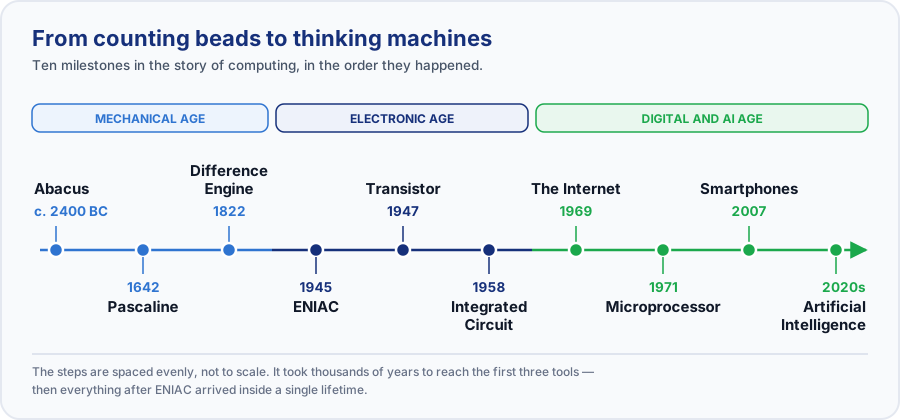 Five thousand years on one line. Notice how much of it happens after 1940.
| Year | Milestone | Why it mattered |
|---|---|---|
| c. 2400 BC | Abacus | The first counting tool — beads representing place value. |
| 1642 | Pascaline | Pascal's geared adding machine with an automatic carry. |
| 1822 | Difference Engine | Babbage's automatic mechanical calculator. |
| 1945 | ENIAC | The first large-scale electronic (vacuum-tube) computer. |
| 1947 | Transistor | Tiny switch that replaced vacuum tubes — smaller, cooler, reliable. |
| 1958 | Integrated Circuit | Many transistors on one chip — the microchip is born. |
| 1969 | ARPANET | The first packet-switched research network, and the ancestor of the internet. The internet as we know it — many networks joined by shared standards, then opened to the public — came later. |
| 1971 | Microprocessor | A whole CPU on a single chip (Intel 4004). |
| 2007 | Smartphones | A powerful networked computer in everyone's pocket. |
| 2020s | Artificial Intelligence | Machines that learn, reason and create. |
Watch out — ARPANET is not the internet
People often say "the internet was invented in 1969". What began in 1969 was ARPANET, a single research network linking a handful of university computers. The internet is what you get when many separate networks agree on a common set of rules so they can talk to each other — a later development, and one that only reached ordinary households years afterwards. Getting this distinction right is the difference between knowing a date and understanding what happened.
Try it yourself
- On paper, create your own chronological timeline including: Abacus, Pascaline, Difference Engine, ENIAC, Transistor, Integrated Circuit, Microprocessor, ARPANET, Smartphones, Artificial Intelligence.
- For each, write the year and one sentence on why it mattered.
- Compare your version with the table above to check yourself.
- Pick the three entries you found most surprising and write a sentence on each saying why. If you would like feedback, post one of them in the Q&A tab of this lesson.
Check your understanding — Session 1
Answer these from memory, then check yourself against Answers to the checks at the end of this part.
- Why is the abacus considered important even though it has no electronics?
- What key idea did the Jacquard loom contribute to computing?
- Why is Ada Lovelace called the world's first programmer?
- A friend tells you "the internet was invented in 1969." What would you say to correct them, and why does the difference matter?
Good place to stop. That is Session 1 done — about 65 minutes. When you come back, start at Session 2, which sorts electronic computers into five generations and covers the first three of them.
Session 2 — The Five Generations of Computers
Each "generation" is defined by the core technology used to build the computer. As that technology shrank and sped up, computers became smaller, faster, cheaper, and smarter. Let's meet the first three.
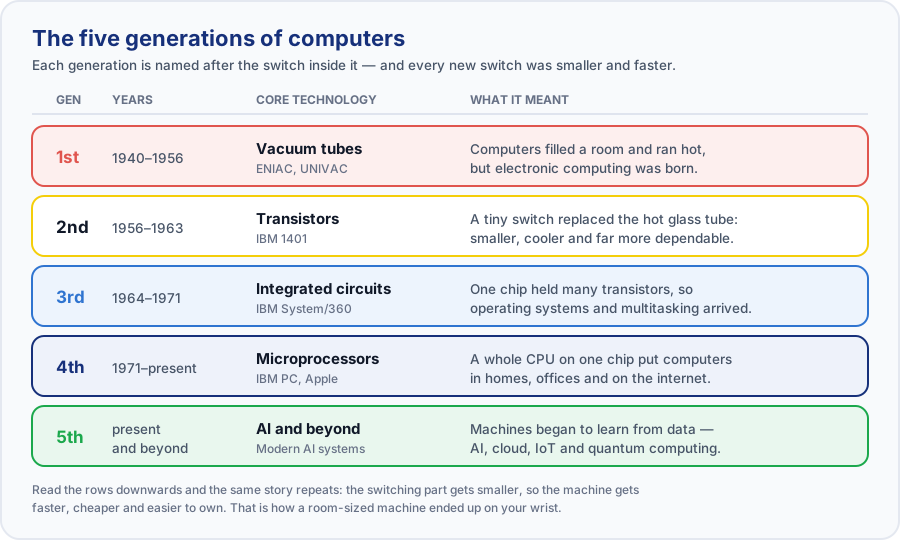 Each generation is named after the switching technology inside it.
Historians divide the age of electronic computers into five generations, each marked by a leap in the technology used to process information. The pattern is remarkably consistent: a new component appears that is smaller, faster, cheaper and more reliable than the last — and suddenly computers can do far more, for far more people. Keep that pattern in mind as we go; it explains why a machine that once filled a room now fits on your wrist.
First Generation (1940–1956) — Vacuum Tubes
ENIAC and UNIVAC.
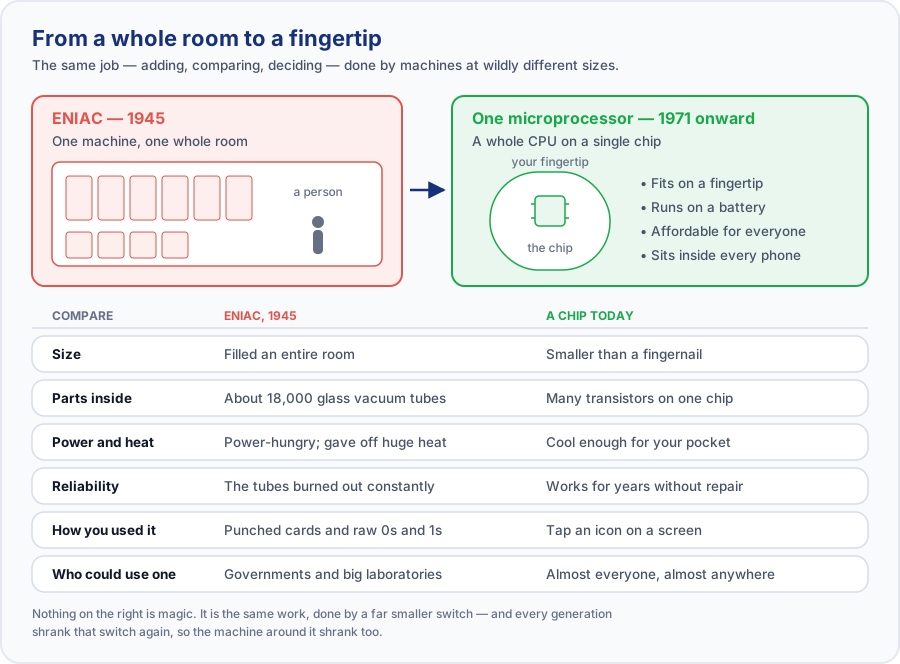 The same amount of computing, shrunk by a factor no one in 1945 would have believed.
- Built with vacuum tubes for circuitry and magnetic drums for memory
- Enormous — a single machine could fill an entire room
- Programmed in machine language (raw 1s and 0s); input via punched cards
- ENIAC (1945) had about 18,000 vacuum tubes; UNIVAC (1951) was the first commercial computer
These machines were a genuine breakthrough and a genuine nuisance to own.
Advantages
- The fastest calculating devices of their era.
- Made electronic, programmable computing possible for the first time.
Limitations
- Huge — a single machine could occupy a whole room.
- Hugely expensive to buy and to run.
- Power-hungry, and gave off enormous heat.
- Unreliable: the vacuum tubes burned out constantly and had to be replaced.
Second Generation (1956–1963) — Transistors
Smaller, faster, more reliable.
- The transistor (invented 1947 at Bell Labs) replaced bulky vacuum tubes
- Computers became far smaller, faster, cheaper and more energy-efficient
- Generated much less heat and were dramatically more reliable
- First high-level languages appeared: COBOL (business) and FORTRAN (science)
- Example machines: IBM 1401, IBM 7090
The transistor fixed most of what was wrong with the vacuum tube, but computers stayed out of reach of ordinary people.
Advantages
- Smaller, cheaper and cooler-running than tube machines.
- Far more reliable — nothing burned out every few hours.
- Easier to program, thanks to the first high-level languages.
Limitations
- Still needed air-conditioned rooms and skilled operators.
- Still owned almost entirely by large companies and governments.
Third Generation (1964–1971) — Integrated Circuits
The chip arrives.
- Many transistors packed onto a single integrated circuit (IC) or "chip"
- Computers got even smaller, cheaper and more powerful
- Introduced operating systems and multiprogramming (running several tasks at once)
- Keyboards and monitors replaced punched cards for interaction
- Example machine: the hugely successful IBM System/360 family
The chip changed the economics of computing, but not yet far enough to reach the home.
Advantages
- Smaller and more reliable again, with far fewer separate parts to fail.
- Cheaper, so more organizations could afford one.
- Operating systems made computers much easier to use.
Limitations
- Still far too costly for an individual to own.
- The personal computer was still a generation away.
Deep dive — Moore's Law: why computers keep getting better
In 1965, Intel co-founder Gordon Moore noticed that the number of transistors engineers could fit on a chip was roughly doubling every year, and predicted the trend would continue. Ten years later, in 1975, he revised the pace to about every two years — and it is that revised version most people mean when they say Moore's Law. For decades it held, which is why each new phone or laptop arrived faster and cheaper than the last. It is the engine behind the whole "smaller, faster, cheaper" pattern of the generations. Note that it was never a law of physics: it was an observation about an industry, and one that has slowed in recent years as transistors approach the size of a few atoms.
Comparing the first three generations
Before you read the table, try to fill it in yourself. Copy the five feature names in the left-hand column into your notebook, write what you remember for each generation, then scroll down and compare.
| Feature | 1st Generation | 2nd Generation | 3rd Generation |
|---|---|---|---|
| Period | 1940–1956 | 1956–1963 | 1964–1971 |
| Core technology | Vacuum tubes | Transistors | Integrated circuits |
| Example machine | ENIAC / UNIVAC | IBM 1401 | IBM System/360 |
| Size and cost | Room-sized, very costly | Smaller and cheaper | Smaller still, more affordable |
| Language | Machine language | COBOL, FORTRAN | High-level plus operating systems |
Try it yourself
- Copy the blank feature column into your notebook and fill in all three generations from memory.
- Check your answers against the table above and mark what you missed.
- In one sentence each, explain why transistors improved on vacuum tubes, and why integrated circuits improved on transistors.
Check your understanding — Session 2
Answer these from memory, then check yourself against Answers to the checks at the end of this part.
- Name the core technology that defines each of the first three generations.
- Give two reasons transistors were better than vacuum tubes.
- Someone tells you Moore's Law is "a law of physics that guarantees computers double in speed every two years." Name two things wrong with that sentence.
Good place to stop. That is Session 2 done — about 40 minutes. When you come back, start at Session 3, which covers the two generations you have actually lived through: personal computers, and artificial intelligence.
Session 3 — Fourth and Fifth Generation Computers
This is the era you live in — from the first personal computers on every desk to artificial intelligence in your pocket.
The first three generations put computers into laboratories, governments and big businesses. The fourth generation put them into homes. The fifth — the one unfolding right now — is teaching them to think. These last two generations have changed daily life faster and more deeply than anything before them.
Fourth Generation (1971–present) — Microprocessors and the Personal Computer
- The microprocessor put an entire CPU on a single chip (Intel 4004, 1971)
- Personal computers brought computing into homes and offices
- The IBM PC (1981) set the standard for business computing
- Apple and Microsoft Windows made computers friendly and visual (the GUI)
- Computers connected together into networks and, eventually, the internet
This is the generation that put a computer on an ordinary desk — and revealed the one thing it still could not do.
Advantages
- Small, powerful and cheap enough for a household or a small business to own.
- Graphical interfaces meant you no longer had to memorize commands to use one.
- Networking let separate machines share work, files and messages.
Limitations
- The machine still does exactly what it is told, step by step.
- It does not truly "understand" the task, and it does not learn on its own.
Key idea — "affordable" is relative
The fourth generation is usually described as the moment computers became affordable, and by comparison with a room-sized machine they were. But "affordable" arrived at very different times in different places. In much of the world, including the Philippines, the device that actually put a computer in most people's hands was not the desktop PC at all — it was the mobile phone, decades later. Keep that in mind as you read the standard Western account of this generation; it is accurate, but it is not the only timeline.
Three names defined this generation:
| Milestone | Years | What it did |
|---|---|---|
| IBM PC | 1981 | The machine that standardized business computing. The IBM Personal Computer set the template that most desktop computers still follow today, and made computers a normal part of the workplace. |
| Apple | 1976–84 | Made computers personal, friendly and creative. Apple helped bring the personal computer — and later the graphical, mouse-driven interface — to everyday people in homes and schools. |
| Microsoft Windows | 1985 onward | The graphical interface that put computers on every desk. Windows made computers visual and approachable with icons, windows and a mouse, and became the most widely used desktop system in the world. |
Deep dive — The GUI: why you don't type commands to open an app
Early computers were controlled by typing text commands. The Graphical User Interface (GUI) — pioneered at Xerox and popularized by Apple and Microsoft Windows — replaced that with windows, icons, menus and a mouse pointer. Suddenly anyone could use a computer without memorising commands. Tapping an app on your phone is the direct descendant of this idea.
Fifth Generation (present and beyond) — Artificial Intelligence and Beyond
- Artificial Intelligence and Machine Learning — computers that learn from data instead of being told every step
- Robotics — machines that sense and act in the real world
- Cloud Computing — power and storage delivered over the internet
- Quantum Computing — a radically new way to compute using physics
- Internet of Things (IoT) — everyday objects connected online
This generation is still being written, so its advantages and its problems are arriving at the same time.
Advantages
- Machines can recognize speech, text and images well enough to be useful.
- They can make predictions from patterns in past data.
- They can automate complex tasks that used to need a trained person.
Limitations
- AI systems inherit bias from the data they were trained on.
- They make confident mistakes — a wrong answer looks exactly like a right one.
- They raise unsettled questions about privacy, jobs and accountability.
The five technologies that define this generation:
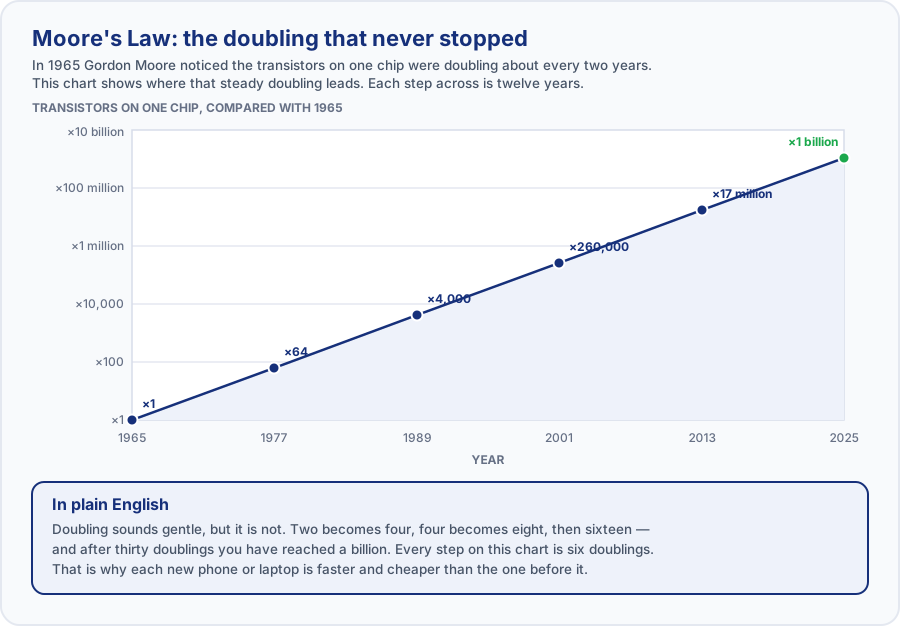 Doubling, over and over. This curve is why the phone in your pocket outruns the computers that ran the moon landings.
| Technology | In short | What it actually means |
|---|---|---|
| Machine Learning | Systems that learn patterns from data. | Instead of being explicitly programmed for every case, machine-learning systems improve by finding patterns in examples — powering everything from spam filters to recommendations. |
| Robotics | Machines that sense and act in the physical world. | Robots combine sensors, AI and motors to perform tasks — from factory assembly and warehouses to surgery and space exploration. |
| Cloud Computing | Computing power delivered over the internet. | The cloud lets you store data and run software on powerful remote servers, accessible from anywhere on any device. |
| Quantum Computing | A radically new way to process information. | Quantum computers use "qubits" and the strange rules of quantum physics to tackle certain problems far beyond today's machines. |
| Internet of Things | Everyday objects connected online. | From smart watches and doorbells to smart homes and factories, IoT connects physical devices to the internet so they can share data and be controlled remotely. |
How is AI changing our world?
Read down the table, then answer the question in the last column for yourself in your notebook. If you would like a reply, post one of your answers in the Q&A tab of this lesson.
| Area | How AI is transforming it | Think about |
|---|---|---|
| Education | Tutoring tools that adapt to a learner's pace and give instant feedback, so a teacher's time goes to mentoring rather than marking. | Have you ever used an app that adapts to how you learn? |
| Healthcare | Reading X-ray, CT and MRI scans to flag problems early. It supports the doctor's judgment; it does not replace it. | Would you trust an AI "second opinion" on a medical scan? Why or why not? |
| Business | Spotting fraudulent transactions as they happen, plus chatbots, sales forecasting and product recommendations. | Which shops or apps do you think already use AI to recommend things to you? |
| Programming | Assistants that write a function from a plain-English request, and explain unfamiliar code. The programmer still has to check the result. | How might AI change which skills a programmer needs most? |
| Daily Life | Spam and scam filters on your messages, plus voice assistants, map routing, face unlock and streaming recommendations. | Count how many times you used AI today without realizing it. |
Those are single examples, not the full picture. In education, AI also translates lesson material and answers learner questions at any hour. In healthcare, it is used to predict disease risk, speed up the search for new medicines, and power wearables that monitor heart rate. In business, it also automates repetitive paperwork. For programming, it lowers the barrier for a beginner and multiplies what an expert can build. And in daily life it is largely invisible — most people use it dozens of times a day without ever deciding to.
All five generations at a glance
| Generation | Period | Core technology | Example | Key milestone |
|---|---|---|---|---|
| First | 1940–1956 | Vacuum tubes | ENIAC, UNIVAC | First electronic computers |
| Second | 1956–1963 | Transistors | IBM 1401 | Smaller machines; COBOL and FORTRAN |
| Third | 1964–1971 | Integrated circuits | IBM System/360 | Operating systems and multiprogramming |
| Fourth | 1971–present | Microprocessors | IBM PC, Apple | Personal computers and the internet |
| Fifth | present and beyond | AI and beyond | Modern AI systems | Machine learning, cloud, IoT, quantum |
Try it yourself
- List every device in your home that contains a microprocessor — phones, TV, router, washing machine, car.
- Beside each one, note whether it also connects to the internet (making it part of the Internet of Things).
- Pick one AI feature you used today and write two sentences on what it did and what data it needed.
Check your understanding — Session 3
Answer these from memory, then check yourself against Answers to the checks at the end of this part.
- What is the key difference between the fourth and fifth generations?
- Name three fifth-generation technologies.
- A relative shows you a confident answer an AI chatbot gave them about a medicine, and asks whether they should act on it. Using what this session says about the limitations of AI, what do you tell them?
Good place to stop. That is Session 3 done — about 45 minutes. When you come back, start at Session 4, the short closing session: the four people behind these ideas, and how all of this landed in the Philippines.
Session 4 — The Minds Behind Computing
Technology doesn't invent itself. Meet four of the visionaries whose ideas made the modern computer possible.
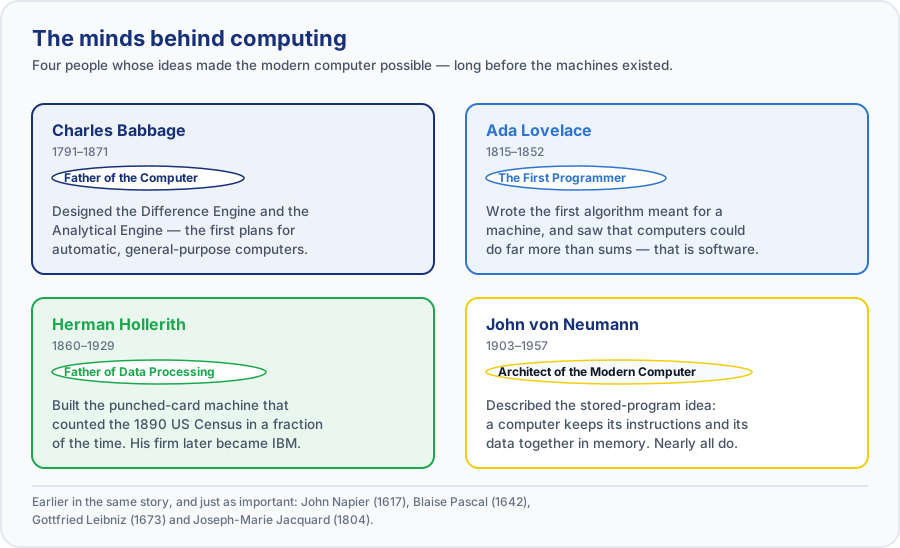 The people behind the machines — and the ideas each of them is remembered for.
| Name | Dates | Known as | Why they matter |
|---|---|---|---|
| Charles Babbage | 1791–1871 | Father of the Computer | English mathematician who designed the Difference Engine and the Analytical Engine — the first plans for automatic and general-purpose computers. |
| Ada Lovelace | 1815–1852 | The First Programmer | Wrote the first algorithm intended for a machine and foresaw that computers could go far beyond arithmetic — the first person to grasp the idea of software. |
| Herman Hollerith | 1860–1929 | Father of Data Processing | Invented the punched-card tabulating machine that sped up the 1890 US Census; the company he founded became IBM. |
| John von Neumann | 1903–1957 | Architect of the Modern Computer | Described the "stored-program" architecture — where a computer keeps its instructions and data together in memory — used by almost every computer since. |
How this landed in the Philippines
The history above is mostly a Western one, because that is where the machines were built. But the part that matters to you is what happened when the technology arrived here — and in the Philippines it arrived in a distinctive order.
Work came first. Cheap networking and cheap computing made it possible for a company in one country to have its customer service, accounting, medical transcription or software development done in another. The Philippines became a major destination for that work, and the contact center and wider business process outsourcing (BPO) industry grew into a significant employer of Filipino graduates. It created a kind of job that simply did not exist before the fourth generation: sitting at a networked computer in Manila or Cebu, working a shift timed to a customer on the far side of the world.
The internet arrived by phone, not by desk. In many countries people met the internet on a desktop PC and only later on a mobile. Here, for large numbers of people, the phone came first — and for many it is still the only computer in the household. That is why so many Philippine services are designed mobile-first, and why "I'll do it on my phone" is the normal answer rather than the fallback.
Then money followed. Mobile wallets and QR codes moved everyday payments — sending money to family, paying a bill, buying from a sari-sari store — onto the same phone. A country where many people never held a bank account moved much of its daily money onto software without passing through the cheque-and-branch era at all.
Notice the pattern: each of these is a jump straight to the newest available technology, skipping the step that richer countries went through. That is a normal way for technology to spread, and it is worth remembering whenever a course like this one describes a "standard" sequence of events.
Try it yourself
- Of the four pioneers above, choose the one whose contribution you think you would miss most if it had never happened. Write three sentences justifying your choice.
- Think of one job you know of — your own, a family member's, or one you would like — that either did not exist fifty years ago or is done completely differently now. Write down what the computer actually changed about it.
- List the last five payments you made. For each, note whether it was cash or digital, and what the digital ones needed in order to work.
Check your understanding — Session 4
Answer these from memory, then check yourself against Answers to the checks at the end of this part.
- What is John von Neumann remembered for, and why does it matter to every computer you use?
- Name two ways computing changed the way people in the Philippines work or handle money.
- A friend says the personal computer was what put computing into ordinary Filipino hands. Do you agree? Explain your answer.
Good place to stop. That is the last session of this part. What follows is the glossary, the recap and the final check — about 20 minutes of review whenever you are ready.
Glossary
The essential vocabulary of this module. Keep this section handy while you study.
| Term | What it means |
|---|---|
| Algorithm | A precise, step-by-step set of instructions for solving a problem. |
| Artificial Intelligence (AI) | Computer systems that perform tasks normally needing human intelligence — a fifth-generation hallmark. |
| Binary | A number system using only 0 and 1 — the language all digital computers use internally. |
| Bit | A single binary digit: 0 or 1. The smallest unit of information. |
| Cloud computing | Using computing power and storage delivered over the internet instead of on your own machine. |
| CPU | Central Processing Unit — the "brain" that carries out a computer's instructions. |
| GUI | Graphical User Interface — controlling a computer with windows, icons and a mouse instead of typed commands. |
| Hardware | The physical parts of a computer you can touch — chips, screen, keyboard, storage. |
| High-level language | A human-friendly programming language (e.g. COBOL, FORTRAN, Python) that is translated for the computer. |
| Input / Output | Information going into a computer (input) and the results it gives back (output). |
| Integrated Circuit (IC) | A single chip holding many transistors; defines the third generation ("microchip"). |
| Internet of Things (IoT) | Everyday physical objects connected to the internet so they can share data and be controlled. |
| Machine language | The raw 0s and 1s a CPU understands directly; used to program first-generation computers. |
| Machine Learning | A type of AI where systems learn patterns from data instead of being explicitly programmed. |
| Memory (RAM) | Where a computer temporarily stores data and instructions it is actively using. |
| Microprocessor | An entire CPU on one chip (e.g. Intel 4004, 1971); made personal computers possible (4th gen). |
| Operating System | Software that manages a computer's hardware and runs other programs (e.g. Windows, Linux). |
| Program | A set of instructions (software) that tells a computer how to perform a task. |
| Punched card | A stiff card with holes that stores data or instructions; used from the Jacquard loom to the 1970s. |
| Quantum computing | A new kind of computing that uses quantum physics ("qubits") to solve certain problems far faster. |
| Software | The instructions (programs) that tell the hardware what to do. |
| Transistor | A tiny electronic switch that replaced vacuum tubes — smaller, faster and reliable (2nd gen). |
| Vacuum tube | An early electronic switch used in first-generation computers; large, hot and unreliable. |
Recap — key takeaways
The big ideas to remember from this module.
- Information technology evolved over thousands of years — from counting tools to intelligent machines — through many small, brilliant steps.
- Early inventions gave us ideas we still use: place value (abacus), binary (Leibniz), stored programs and punched cards (Jacquard, Hollerith), CPU + memory architecture (Babbage, von Neumann), and software itself (Lovelace).
- Computers are grouped into five generations, each defined by its core technology: vacuum tubes, then transistors, then integrated circuits, then microprocessors, then artificial intelligence.
- Every generation followed the same pattern — smaller, faster, cheaper, and more capable (see Moore's Law).
- Today's fifth generation — AI, cloud, IoT and quantum — is transforming education, healthcare, business, programming and daily life.
Check yourself
Answer these from memory before you move on. Model answers are in Answers to the checks at the end of this part.
- Who is considered the Father of the Computer, and what did he design?
- Which generation introduced transistors, and what did they replace?
- What technology characterises the fifth generation of computers?
- Who wrote the first computer algorithm, and for which machine?
- What is the difference between hardware and software — and which one did the Jacquard loom's punched cards represent?
Watch and learn
These videos are optional — everything you will be assessed on is in the text above. If you only watch one, watch the first. Each is labelled with the session it supports.
Early Computing: Crash Course Computer Science #1
CrashCourse — supports Session 1.
If the player above does not load, watch “Early Computing: Crash Course Computer Science #1” on YouTube.
Babbage's Analytical Engine
Computerphile — supports Session 1.
If the player above does not load, watch “Babbage's Analytical Engine” on YouTube.
The Story of Ada Lovelace: The World's First Computer Programmer
IET — supports Session 1.
If the player above does not load, watch “The Story of Ada Lovelace: The World's First Computer Programmer” on YouTube.
Electronic Computing: Crash Course Computer Science #2
CrashCourse — supports Session 2.
If the player above does not load, watch “Electronic Computing: Crash Course Computer Science #2” on YouTube.
How Does a Transistor Work?
Veritasium — supports Session 2. This one goes deeper into the physics of the transistor than this course requires; treat it as extra.
If the player above does not load, watch “How Does a Transistor Work?” on YouTube.
Every Computer Generation Explained in 4 Minutes
Byte Sized Explainer — supports Sessions 2 and 3.
If the player above does not load, watch “Every Computer Generation Explained in 4 Minutes” on YouTube.
Quantum Computers Explained - Limits of Human Technology
Kurzgesagt — supports Session 3. Quantum computing is one bullet point in this part; this video goes well beyond it, so treat it as extra.
If the player above does not load, watch “Quantum Computers Explained - Limits of Human Technology” on YouTube.
If a video will not play, it may be blocked on your network. Everything it covers is already in the lesson text above, so you are not missing anything you will be examined on.
Answers to the checks
Compare these with what you wrote. If an answer surprises you, go back to that session before moving on — that gap is exactly what the exam will find. Use this section to check your own answers against — it is not meant to be read straight through.
Session 1 — the recall activity
These are the answers to the third column you filled in for Which inventions still live on?
- Abacus (c. 2400 BC). Place value and representing numbers physically — the foundation of all computing.
- Napier's Bones (1617). Turning hard math into simple steps — the ancestor of the slide rule.
- Pascaline (1642). The automatic "carry" mechanism at the heart of every mechanical calculator.
- Leibniz Calculator (1673). The binary (0/1) system that all digital computers use today.
- Jacquard Loom (1804). The concept of a stored, swappable "program" controlling a machine.
- Difference Engine (1822). Automatic, reliable, error-free computation performed by a machine.
- Analytical Engine (1837). CPU + memory + input/output — the architecture of every modern computer.
- Ada Lovelace's notes (1843). The very concept of software — and that computers could do more than arithmetic.
- Hollerith's Machine (1890). Automated data processing at scale — and the origins of IBM.
Session 1
- Why is the abacus considered important even though it has no electronics?
Because it introduced the idea of representing numbers physically using place value and manipulating them with simple, fixed rules — the core concept behind all computing. - What key idea did the Jacquard loom contribute to computing?
The idea of controlling a machine with stored, swappable instructions (punched cards) — an early example of a "program" separate from the hardware. - Why is Ada Lovelace called the world's first programmer?
She wrote the first detailed algorithm intended for Babbage's Analytical Engine, and realized computers could manipulate more than just numbers. - A friend tells you "the internet was invented in 1969." What would you say to correct them, and
why does the difference matter?
What started in 1969 was ARPANET, a single research network connecting a few university computers. The internet is what you get when many separate networks agree on common rules so they can talk to each other, which came later, and reaching ordinary households later still. A good answer names ARPANET, says it was one network rather than the internet, and explains that the internet is really an agreement between networks — which is why no single person or country "invented" it.
Session 2
- Name the core technology that defines each of the first three generations.
1st generation = vacuum tubes; 2nd generation = transistors; 3rd generation = integrated circuits. - Give two reasons transistors were better than vacuum tubes.
Any two of: smaller, faster, cheaper, more reliable, less heat, less power used. - Someone tells you Moore's Law is "a law of physics that guarantees computers double in speed
every two years." Name two things wrong with that sentence.
First, it is not a law of physics — it is an observation Moore made about the chip industry in 1965 (then at about a doubling a year), which he revised in 1975 to roughly every two years. Second, it describes the number of transistors on a chip, not speed directly, and nothing guarantees it will continue; the pace has in fact slowed as transistors approach the size of a few atoms. A good answer challenges both the word "law" and the word "guarantees".
Session 3
- What is the key difference between the fourth and fifth generations?
The 4th generation is defined by microprocessors and personal computers — speed and access for everyone. The 5th is defined by artificial intelligence — machines that learn from data rather than being told every step. - Name three fifth-generation technologies.
Any three of: artificial intelligence, machine learning, robotics, cloud computing, quantum computing, the Internet of Things. - A relative shows you a confident answer an AI chatbot gave them about a medicine, and asks
whether they should act on it. What do you tell them?
Tell them not to act on it without checking with a pharmacist or doctor. A good answer uses the limitation named in this session: an AI system can make a confident mistake, and a wrong answer looks exactly like a right one — there is no change in tone to warn you. It should also make the positive point that AI is genuinely useful here as a starting point or a way to understand terminology, but the decision needs a human professional who can see the whole situation.
Session 4
- What is John von Neumann remembered for, and why does it matter to every computer you use?
He described the "stored-program" architecture, where a computer keeps its instructions and its data together in the same memory. It matters because it is why one machine can run any program you load onto it, instead of being rewired for each new job — almost every computer since has been built this way. - Name two ways computing changed the way people in the Philippines work or handle money.
Any two of: cheap computing and networking created contact center and wider BPO work, a kind of job that did not exist before; the internet arrived for most people through a mobile phone rather than a desktop, so services here are built mobile-first; and mobile wallets and QR codes moved everyday payments onto the phone for many people who had never held a bank account. - A friend says the personal computer was what put computing into ordinary Filipino hands. Do you
agree?
A good answer disagrees, at least in part, and says why: for large numbers of people here the first — and often only — computer in the household was a mobile phone, not a desktop PC. It should note that the standard account of the fourth generation is accurate for the countries where those machines were sold cheaply, and that technology often reaches a place by jumping straight to the newest available form rather than repeating every step.
Check yourself
- Who is considered the Father of the Computer, and what did he design?
Charles Babbage. He designed the Difference Engine, a mechanical calculator for producing mathematical tables automatically, and the Analytical Engine, a general-purpose programmable computer with a "mill" (processor), a "store" (memory) and punched-card input. - Which generation introduced transistors, and what did they replace?
The second generation (1956–1963). Transistors replaced vacuum tubes, and were smaller, faster, cheaper, cooler and far more reliable. - What technology characterizes the fifth generation of computers?
Artificial intelligence — machines that learn patterns from data instead of being programmed step by step — together with machine learning, robotics, cloud computing, quantum computing and the Internet of Things. - Who wrote the first computer algorithm, and for which machine?
Ada Lovelace, for Charles Babbage's Analytical Engine. Her notes included a step-by-step method for the machine to calculate Bernoulli numbers. - What is the difference between hardware and software — and which one did the Jacquard loom's
punched cards represent?
Hardware is the physical part you can touch; software is the set of instructions that tells the hardware what to do. The punched cards were the software — the loom itself was the hardware, and swapping the cards changed what it produced without changing the machine. A good answer gives both definitions and explicitly says the cards are the software, with the loom as the hardware.